The brief
Footing is the platform a builder runs their business on. Not the tool they estimate in, and not the enterprise system a national contractor buys, but the layer in between: the system of record for the builder who is running fifteen jobs at once and holding the whole thing together with spreadsheets, email, and memory.
I started Footing as a solo founder venture through my studio, Mania Design. The goal was specific from the start: build the coordination platform for small-to-mid Australian builders, the ones too big for a tradie app and too small for Procore, and design it around how they actually run work rather than how software vendors think they should.
The research
I did not want to design this from assumptions, so I ran interviews with builders and tradespeople across the range of the market: a solo joiner quoting his own work, a project manager at a tier-two commercial builder, a site manager running large fit-outs, and the office of a mid-size commercial builder turning over around fifteen million a year. The same problems came back at every scale.
Quoting is manual and lossy. The solo joiner does every quote by hand, thirty minutes to an hour each, sends ten to fifteen a month, and wins three to five. At the commercial end, estimators get about three weeks to price a job, and a single missed line item becomes someone else’s problem on site.
Variations leak revenue, quietly. This was the sharpest, most quantified pain. The mid-size builder’s office estimated around two hundred thousand dollars a year in variations that were done but never billed. On the joiner’s smaller jobs it was a few thousand a year, and as he put it, “the odds are you’re more likely to get caught.” At the commercial end, contracts give you five days to notify a variation, so a change that slips through the cracks is not just unbilled, it is time-barred and gone.
Nobody can see the money in real time. The mid-size builder runs on a daily spreadsheet filled out by hand: “if I put one number wrong, it throws the whole thing out.” Overspend only surfaces at the end of a job. One example that stuck with me: thirty-five thousand dollars of excess aluminium sitting in the yard because every job orders a couple of spare lengths and nobody tracks it. A project manager summed up the stakes plainly: “a project can cost twenty to thirty thousand a week to run.”
Context lives in people’s heads and inboxes. A site manager described receiving more than a hundred emails a day and called the email trails that hold a job together “horrible and terrible.” Roughly half the state of any job lives outside every system. If a PM left tomorrow, continuity would be at serious risk.
The tools these builders use are not bad. Xero is fine for accounts, Procore is strong for RFIs, their scheduling tools work. The problem is that none of them talk to each other, and no single tool connects quoting to delivery to cost to invoicing in one live view.
The core insight
The research pointed at one sentence, which became the product’s positioning: you’re not short on work, you’re short on control.
The builders I spoke to were busy and capable. What they lacked was a live, single view of where every job stood and what needed them next. The expensive failures, the unbilled variation, the scope gap between two trades, the material nobody reconciled, the procurement that ran late, were all invisible until it was too late to fix them cheaply.
So the design brief was not “add more features.” It was: make the state of every job visible, surface the money as it moves, and put the next action one tap away. Footing’s job is control, not data entry.
Designing the command center
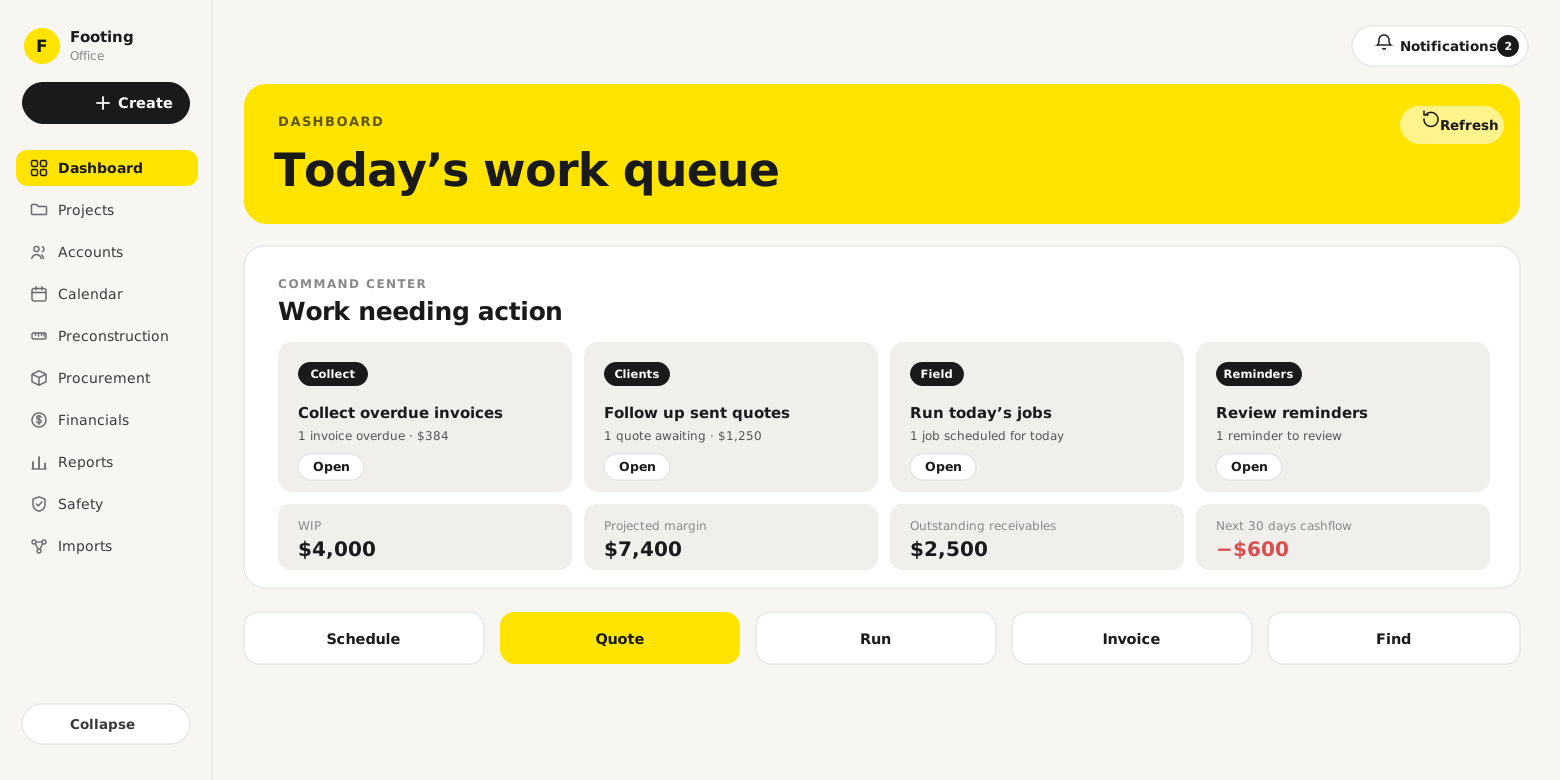
The home screen is built around the question a builder actually wakes up with: what needs me today, and where do I stand. I designed it as a command center rather than a dashboard of charts.
The top band is work needing action, grouped into the handful of things that genuinely require a decision: invoices to collect, quotes to chase, jobs to run today, reminders to review. Directly under it sits the money, the four numbers a builder can never see in one place anywhere else: work in progress, projected margin, outstanding receivables, and the next thirty days of cashflow. That last figure can be negative, and showing it in red on the home screen is deliberate. The whole point of the research was that this number is usually invisible until it hurts.
Below that, a single action bar, schedule, quote, run, invoice, find, lets a builder start any of the five things they do all day without hunting through menus.
One queue for every project
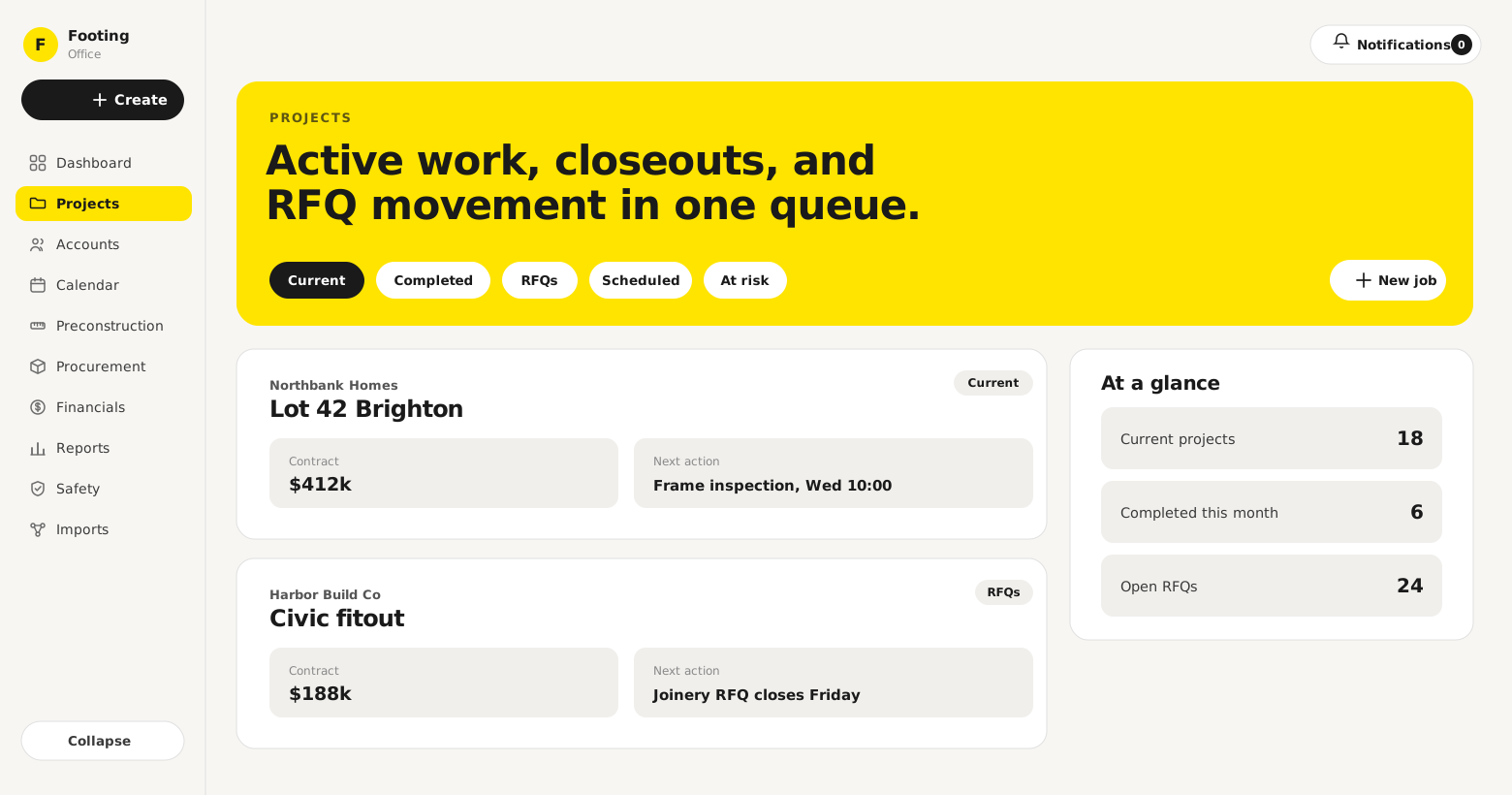
A builder does not think in modules, they think in jobs. The projects view puts active work, closeouts, and RFQ movement into one queue, each job showing its contract value and the one next action that matters, with a small “at a glance” read on how many projects are current, closing, or waiting on suppliers.
This is where the “context lives in inboxes” problem gets solved. Instead of a job’s status living in a hundred emails, it lives on the job: what stage it is at, what it is waiting on, and who is involved. The point is that a PM could hand a project over and nothing would walk out the door with them.
Making the money visible
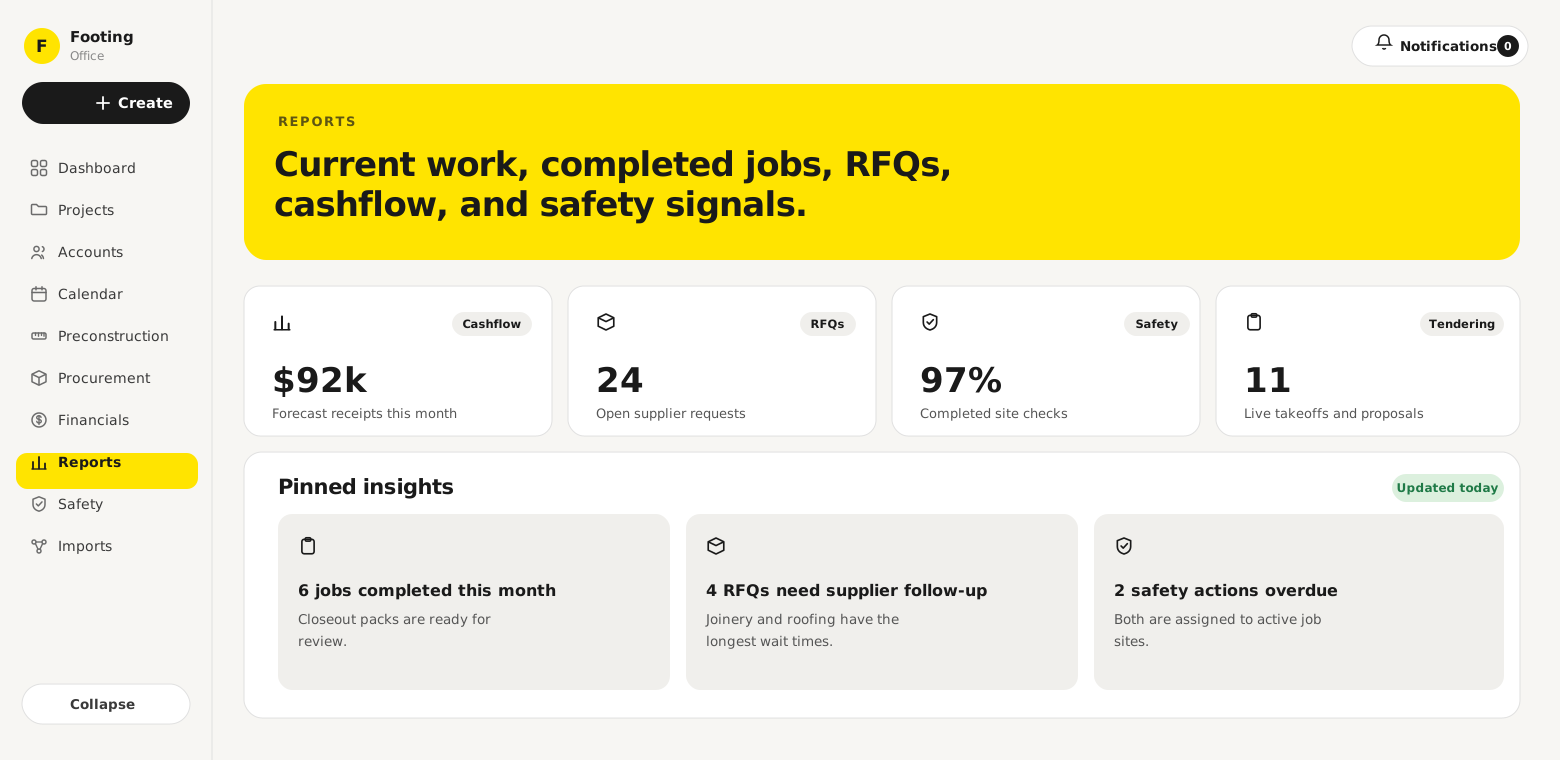
If the biggest leaks are financial and invisible, then the reporting layer is a core feature, not an afterthought. Footing tracks live budget against committed against actual against remaining, by trade, so overspend shows up while there is still time to act on it, not at closeout.
The reports view surfaces the signals a builder would otherwise reconstruct from spreadsheets: forecast cashflow, open supplier requests, safety completion, live tendering. Pinned insights turn those numbers into plain sentences, jobs ready to close out, RFQs waiting on suppliers, safety actions overdue, so the read takes seconds. Variations get captured against the job the moment they are raised, which is the difference between the two hundred thousand dollars a year that leaks and the two hundred thousand that gets billed.
Compliance and the field
Two more research findings shaped whole areas of the product.
Compliance can stop a job. Builders carry SWMS, JSAs, and site inductions as a constant background risk. Footing treats them as first-class: safety forms with mandatory completion gates, a live view of who is blocked, expired, or missing an induction, and an action queue that tells you which worker to chase before they are turned away at the gate.
The work happens where there is no signal. Sub-contractors get scoped access and their own work orders, and the field experience is a mobile app built to keep working offline, so a crew on a slab with no reception can still complete a form or sign off a job and have it sync when they are back in range. The office and the site see the same job, which is the coordination the whole product exists to create.
A design language for builders
Footing does not look like construction software, and that is on purpose. Most tools in this space are either grim enterprise grids or cartoonish tradie apps. I gave Footing an editorial, confident visual language: a warm paper canvas, a single strong yellow, heavy serif headings that name each screen in plain English, and generous cards instead of dense tables. It reads as a product made with care, which matters when you are asking a skeptical builder to move their whole business onto it.
Underneath the look sits a real system. One rule did more work than any other: if a whole panel navigates to one place, the whole panel is the click target. No “open” buttons, no trailing chevrons, no aiming at a tiny link. A builder tapping with a thumb on site hits the card, not a twenty-four pixel button. That single principle, applied everywhere, is a large part of why the product feels fast and obvious rather than fiddly. The rest of the system, the tokens, the primitives, the hover and focus rules, exists to keep that consistency as the product grows.
Where it is now
Footing is pre-launch. The core product is built and in active development, projects, sub-contractors, work orders, variations, RFIs, progress claims, compliance, invoicing, payments, and migration from the tools builders already use. The next step is a founding-customer program with a small group of Adelaide builders, the same kind of operators whose problems the research described, so the product gets tested against real jobs before it goes wide.
It is honestly early, and designed to be proven with real builders rather than launched loud. But the spine is in: quote, deliver, track the money, and get paid, in one place instead of five.
Reflection
The discipline on Footing was resisting the urge to add. Every builder I spoke to already had plenty of software. What they did not have was one place where the work, the money, and the people met, so the design job was connection, not invention: take the flow a builder already lives, quote to delivery to cost to claim, and make it visible and single instead of scattered across systems that never speak.
The other lesson was that in a trade this practical, credibility is a design outcome. The research told me builders have been burned by software that overpromised, so the product had to feel controlled, fast, and honest in the first five minutes: the whole card is the target, the cashflow number is right there in red, and every screen says in plain words what it is for. Doing the research first, then the design, then the build, meant I could hold that thread from a builder’s offhand complaint in an interview all the way to the shape of the screen it fixes.